
i‑effect® system requirements
In order to use i‑effect® effectively and to its full extent on your system, certain requirements must be met. Please note the necessary requirements for the use of i‑effect®. If you have any questions regarding the system requirements, please contact our support.
| i‑effect® Version | IBM i Version | Status | ||
|---|---|---|---|---|
| From | To | Minimum | Maximum | |
| 3.1.18 | 3.1.x | 7.4 | 7.5 | released |
| 3.1.6 | 3.1.17 | 7.3 | 7.5 | released |
| 3.1.0 | 3.1.5 | 7.4 | 7.5 | released |
| 3.0.7 | 3.0.x | 7.3 | 7.5 | released |
| 3.0.0 | 3.0.6 | 7.3 | 7.4 | released |
| 2.9.0 | 2.9.x | 7.2 | 7.4 | released |
| 2.8.0 | 2.8.x | 7.2 ¹ | 7.4 | discontinued |
| 2.7.64 | 2.7.x | 7.1 | 7.4 | discontinued |
| 2.7.0 | 2.7.63 | 7.1 | 7.3 | discontinued |
| 2.6.0 | 2.6.x | 6.1 | 7.3 | discontinued |
Tool for automatic checking of system requirements
Download and run the i‑effect® System Check to determine if your system meets all necessary system requirements. The i‑effect® System Check examines the operating system, installed single PTFs, group PTFs and other components for known compatibility problems.
Download System Check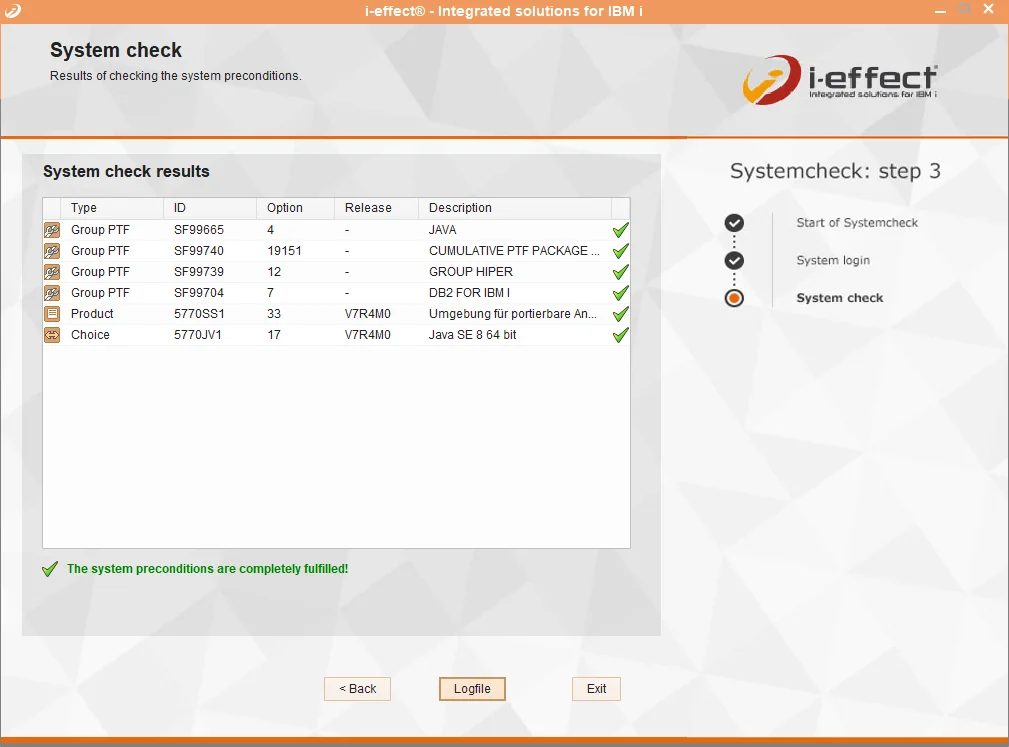
Required group and single PTFs (version-dependent):
1. choose your i‑effect® version:

2. select your IBM i release:

License programs to be installed, if applicable
| License program | Option | Description |
|---|---|---|
| 5770-SS1 | 33 | Portable App Solutions Environment |
| 5770-JV1 | *BASE | (IBM) Developer Kit for Java |
| 5761-JV1 | 16 / 17 | Java Developer Kit 8 (i-effect >= 2.7) |
| 5770-SS1 | 30 | QShell |
Minimum required level of group PTFs
| Group-PTF | Level | Description |
|---|---|---|
| SF99720 | 19297 | CUMULATIVE PTF PACKAGE |
| SF99716 | 23 | Java |
| SF99719 | 159 | Hiper |
| SF99702 | 26 | DB2 |
Required single PTFs
| PTF | Product ID | Product Release |
|---|---|---|
| SI70652 | - | - |
License programs to be installed, if applicable
| License program | Option | Description |
|---|---|---|
| 5770-SS1 | 33 | Portable App Solutions Environment |
| 5770-JV1 | *BASE | (IBM) Developer Kit for Java |
| 5770-JV1 | 16 / 17 | Java Developer Kit 8 (i-effect >= 2.7) |
| 5770-SS1 | 30 | QShell |
Minimum required level of group PTFs
| Group-PTF | Level | Description |
|---|---|---|
| SF99730 | 19116 | CUMULATIVE PTF PACKAGE |
| SF99725 | 13 | Java |
| SF99729 | 87 | Hiper |
| SF99703 | 18 | DB2 FOR IBM I |
License programs to be installed, if applicable
| License program | Option | Description |
|---|---|---|
| 5770-SS1 | 33 | Portable App Solutions Environment |
| 5770-JV1 | *BASE | (IBM) Developer Kit for Java |
| 5770-JV1 | 16 / 17 | Java Developer Kit 8 (i-effect >= 2.7) |
| 5770-SS1 | 30 | QShell |
Minimum required level of group PTFs
| Group-PTF | Level | Description |
|---|---|---|
| SF99739 | 12 | GROUP HIPER |
| SF99665 | 4 | JAVA |
| SF99740 | 19151 | CUMULATIVE PTF PACKAGE |
| SF99704 | 7 | DB2 FOR IBM I |
License programs to be installed, if applicable
| License program | Option | Description |
|---|---|---|
| 5770-SS1 | 33 | Portable App Solutions Environment |
| 5770-JV1 | *BASE | (IBM) Developer Kit for Java |
| 5770-JV1 | 16 / 17 | Java Developer Kit 8 (i-effect >= 2.7) |
| 5770-SS1 | 30 | QShell |
Minimum required level of group PTFs
| Group-PTF | Level | Description |
|---|---|---|
| SF99730 | 19116 | CUMULATIVE PTF PACKAGE |
| SF99729 | 87 | Hiper |
| SF99703 | 18 | DB2 FOR IBM I |
| SF99725 | 24 | Java Gruppen PTF Stand Java 8.0 SR 7 |
License programs to be installed, if applicable
| License program | Option | Description |
|---|---|---|
| 5770-SS1 | 33 | Portable App Solutions Environment |
| 5770-JV1 | *BASE | (IBM) Developer Kit for Java |
| 5770-JV1 | 16 / 17 | Java Developer Kit 8 (i-effect >= 2.7) |
| 5770-SS1 | 30 | QShell |
Minimum required level of group PTFs
| Group-PTF | Level | Description |
|---|---|---|
| SF99739 | 12 | GROUP HIPER |
| SF99740 | 19151 | CUMULATIVE PTF PACKAGE |
| SF99704 | 7 | DB2 FOR IBM I |
| SF99665 | 13 | Java Gruppen PTF Stand Java 8.0 SR 7 |
License programs to be installed, if applicable
| License program | Option | Description |
|---|---|---|
| 5770-SS1 | 33 | Portable App Solutions Environment |
| 5770-JV1 | *BASE | (IBM) Developer Kit for Java |
| 5770-JV1 | 16 / 17 | Java Developer Kit 8 (i-effect >= 2.7) |
| 5770-SS1 | 30 | QShell |
Minimum required level of group PTFs
| Group-PTF | Level | Description |
|---|---|---|
| SF99950 | 3 | DB2 for IBM i |
| SF99750 | 22321 | CUMULATIVE PTF PACKAGE |
| SF99959 | 20 | GROUP HIPER |
| SF99955 | 4 | JAVA |
License programs to be installed, if applicable
| License program | Option | Description |
|---|---|---|
| 5770-SS1 | 33 | Portable App Solutions Environment |
| 5770-JV1 | *BASE | (IBM) Developer Kit for Java |
| 5770-JV1 | 16 / 17 | Java Developer Kit 8 (i-effect >= 2.7) |
| 5770-SS1 | 30 | QShell |
| 5770-SS1 | 39 | International Components for Unicode |
| 5770-SS1 | 34 | Digital Certificate Manager |
| 5770-SS1 | 3 | Extended Base Directory Support |
Minimum required level of group PTFs
| Group-PTF | Level | Description |
|---|---|---|
| SF99730 | 22132 | CUMULATIVE PTF PACKAGE C2132730 |
| SF99729 | 162 | GROUP HIPER |
| SF99703 | 29 | DB2 FOR IBM I |
| SF99725 | 26 | JAVA |
License programs to be installed, if applicable
| License program | Option | Description |
|---|---|---|
| 5770-SS1 | 33 | Portable App Solutions Environment |
| 5770-JV1 | *BASE | (IBM) Developer Kit for Java |
| 5770-JV1 | 16 / 17 | Java Developer Kit 8 (i-effect >= 2.7) |
| 5770-JV1 | 20 | Java Developer Kit 17 (i-effect >= 3.1.18) |
| 5770-SS1 | 30 | QShell |
| 5770-SS1 | 39 | International Components for Unicode |
| 5770-SS1 | 34 | Digital Certificate Manager |
| 5770-SS1 | 3 | Extended Base Directory Support |
Minimum required level of group PTFs
| Group-PTF | Level | Description |
|---|---|---|
| SF99739 | 12 | GROUP HIPER |
| SF99740 | 19151 | CUMULATIVE PTF PACKAGE |
| SF99665 | 13 | Java Gruppen PTF Stand Java 8.0 SR 7 |
| SF99704 | 23 | DB2 for IBM i |
License programs to be installed, if applicable
| License program | Option | Description |
|---|---|---|
| 5770-SS1 | 33 | Portable App Solutions Environment |
| 5770-JV1 | *BASE | (IBM) Developer Kit for Java |
| 5770-JV1 | 16 / 17 | Java Developer Kit 8 (i-effect >= 2.7) |
| 5770-JV1 | 20 | Java Developer Kit 17 (i-effect >= 3.1.18) |
| 5770-SS1 | 30 | QShell |
| 5770-SS1 | 39 | International Components for Unicode |
| 5770-SS1 | 34 | Digital Certificate Manager |
| 5770-SS1 | 3 | Extended Base Directory Support |
Minimum required level of group PTFs
| Group-PTF | Level | Description |
|---|---|---|
| SF99950 | 3 | DB2 for IBM i |
| SF99750 | 22321 | CUMULATIVE PTF PACKAGE |
| SF99959 | 20 | GROUP HIPER |
| SF99955 | 4 | JAVA |
License programs to be installed, if applicable
| License program | Option | Description |
|---|---|---|
| 5770-SS1 | 33 | Portable App Solutions Environment |
| 5770-JV1 | *BASE | (IBM) Developer Kit for Java |
| 5770-JV1 | 16 / 17 | Java Developer Kit 8 (i-effect >= 2.7) |
| 5770-SS1 | 30 | QShell |
| 5770-SS1 | 39 | International Components for Unicode |
| 5770-SS1 | 34 | Digital Certificate Manager |
| 5770-SS1 | 3 | Extended Base Directory Support |
Minimum required level of group PTFs
| Group-PTF | Level | Description |
|---|---|---|
| SF99760 | 25312 | |
| SF99969 | 17 | |
| SF99960 | 2 | |
| SF99965 | 4 |
Contact
We will be happy to advise you personally and compile
an individual concept with you. Request now without obligation.
Thank you
Your message was sent successfully
and we will contact you as soon as possible.